How to diff two JSON files
“Diff two JSON files” is three different questions wearing one name, and most online tools answer only the smallest of them — after asking you to upload the data. This is what the questions actually are, what a JSON diff has to get right to be worth using, and a measured answer to the one everybody asks last: how big can the files be?
Three questions, one name
Somebody asks for a JSON diff. They could mean any of these, and the right tool is different for each:
- Which values changed? Two exports of the same endpoint, a week apart. You want the lines that moved and the words inside them.
- Is the data the same, whatever the formatting? One file is minified, the other is pretty-printed, the keys come out in a different order — and you want to know whether any of that matters. This is a structural diff, and it is a genuinely different algorithm.
- Are the bytes the same? A file was round-tripped through a tool and looks untouched. Did the encoding change? Did a BOM appear? Did line endings flip? Did something rewrite one number in place?
Question 1 is a line diff. Question 3 is a byte comparison. Question 2 is the one nobody ships well, and this article is honest about it in its own section rather than pretending the other two cover it.
What to judge a JSON diff on
Six things separate a diff you can rely on from one that merely renders colours.
- Cost tracks the change, not the file. The textbook LCS algorithm builds a table with one cell per pair of lines. Two 30 000-line files need nine hundred million cells — about 1.8 GB — whether they differ in one line or all of them. That single choice is why so many online diff tools quietly stop working in the low thousands of lines. Myers’ O(ND) algorithm costs O((n+m)·D), where D is the edit distance; two near-identical million-line files finish before you can measure it.
- Nothing is uploaded. JSON is where the API keys, the customer records and the internal pricing live. A diff tool that posts both files to a server has made a copy of all of it, on a machine you do not control, for a job your own CPU could have done.
- Word-level marks inside a changed line. A line painted red says something changed. Marking
800→1024inside it says what. - Ignore options that normalise the comparison only. “Ignore whitespace” must change which lines count as equal — never what the rendered row shows. If the screen stops showing the real bytes of the file, the diff has started lying to you in a small way, and small lies are the expensive kind.
- An export a machine can use. A unified
.patchwith real@@hunk headers, not a screenshot of colours. - It says what it did not compare. Every tool has a limit. The ones worth trusting print theirs.
The line diff
Open a JSON file on /json and the toolkit carries a DIFF tab beside FORMATTED, YAML, CSV, GRAPH, HEX and STATS. Side A is pinned to the file you already have open, so the tab only ever asks for the second one: drop it, pick it, or paste the text.
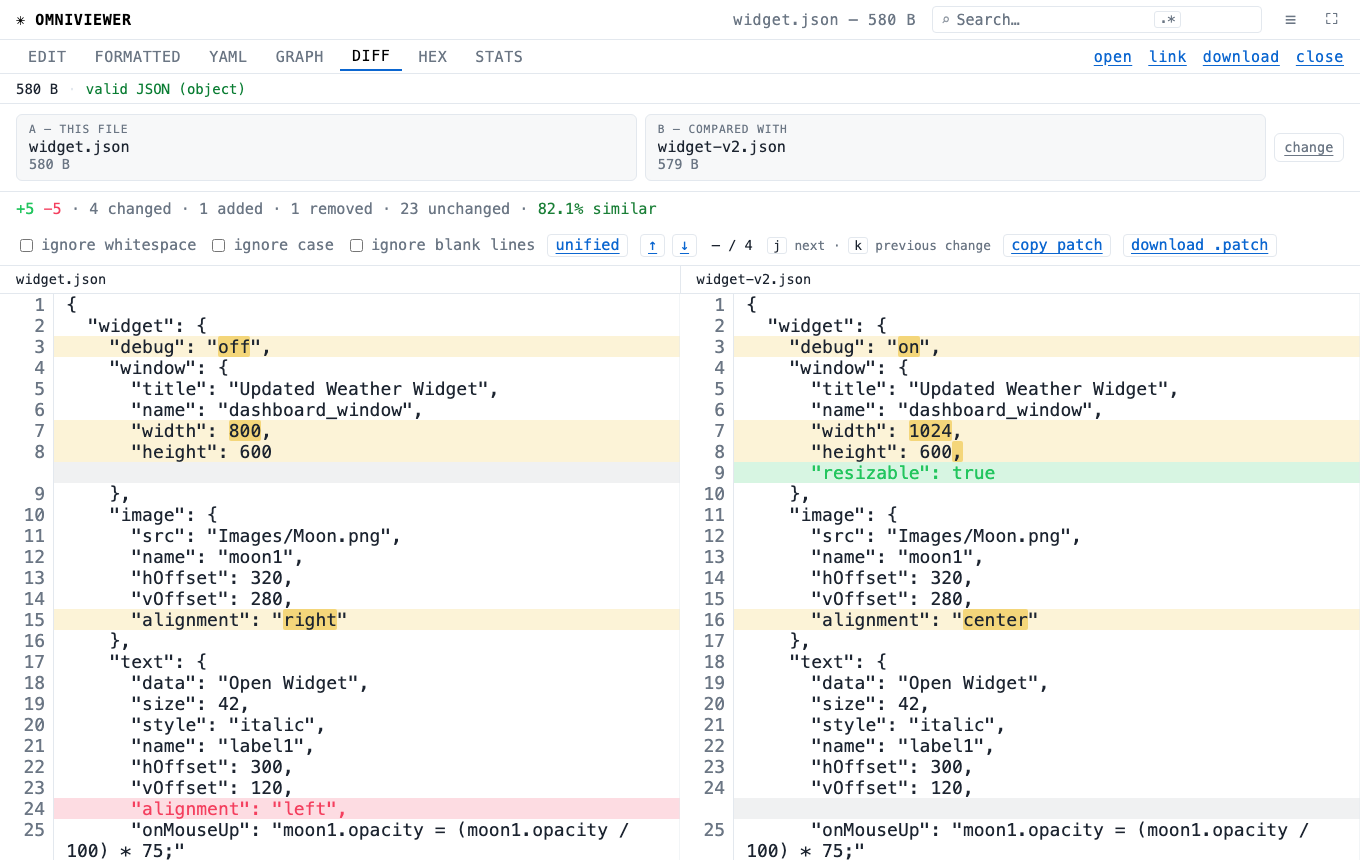
"resizable": true exists only in B, so the left cell is a muted blank rather than the next line sliding up.What it does, in order:
- Hashes every distinct line to an integer once, so the inner loop compares numbers rather than walking strings. The ignore options are applied here, on the comparison key — two lines that normalise the same get the same integer and are therefore equal, at no cost in the loop.
- Runs Myers’ O(ND) diff in linear space, from an explicit stack rather than the call stack (two hundred thousand lines nest deeper than the engine’s frame limit, and a stack overflow inside a Web Worker is not an error message — it is a tab that never finishes).
- Pairs consecutive deletions and insertions into changed rows, so an edited line sits opposite the line it replaced instead of appearing twice, several rows apart.
- Re-runs the same diff over word tokens inside changed rows only, which is where the highlighting in the screenshot comes from.
- Emits a unified patch from the same rows — three lines of context, touching windows merged, one
@@header per merged group — which the copy patch and download .patch buttons hand you.
All of it runs in a Web Worker, so the page never freezes, and none of it touches the network. The full algorithm write-up, with the code and the two details that are easy to get wrong, is in how to diff two huge files in a browser.
The hexadecimal diff
The other half of the toolkit answers question 3, and it is the half people are surprised to want. /diff/bin compares two files byte for byte: it reads both in lockstep in 4 MB blocks, folds each pair of blocks into counters, and throws the blocks away. What survives is fixed in size no matter how big the files are — how many bytes differ, how many bits, the first and last differing offset, a list of the maximal runs of differing bytes, and a 1 024-bucket density map of where they fall.
Here it is on a pair of 100 MB JSON exports where twelve prices were rewritten in place:
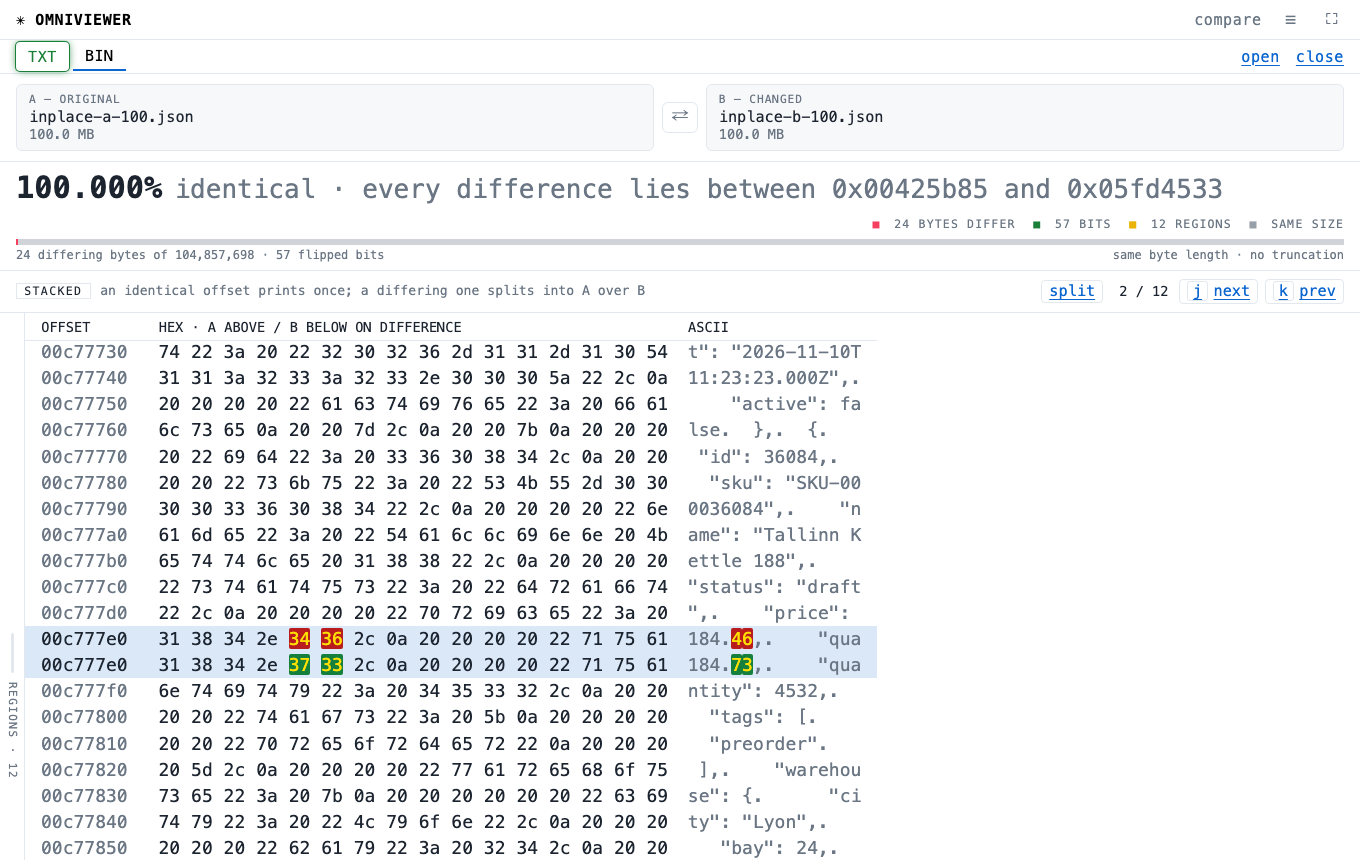
184.46 sits directly above 184.73.Three readings on that screen are worth naming, because a line diff cannot produce any of them:
- Same size. Two files that differ but are byte-for-byte the same length is a strong signal on its own: re-saving a file picks its own length and essentially never lands on the original exactly. Identical size plus a scatter of changed bytes means something was rewritten in place, inside the structure the file already had.
- Flipped bits, not just bytes. 24 bytes and 57 bits, broken down by bit position. A histogram that puts every flip in bit 0 is least-significant-bit steganography; one that spreads flips across all eight planes is whole values being rewritten.
- Where, exactly. Twelve regions, first at
0x00425b85, last at0x05fd4533, each one navigable with j and k. The hex view is windowed — a spacer sized to the full row count, with only the visible rows ever sliced out of the two files — so a 6 GB pair scrolls exactly like a 6 KB one.
This is also the view that answers “my JSON looks identical but the checksum changed”. A UTF-8 BOM is three bytes at offset zero. A CRLF conversion is one extra byte per line, spread evenly through the density map. A trailing-newline change is one region at the very end. All three are invisible to a viewer and obvious here.
Which one answers your question
The two screens are not ranked; they are aligned differently, and that difference decides which to open.
A byte comparison is offset-aligned. It asks “what is at position n in each file?” — which is exactly right when edits happen in place, and exactly wrong when something was inserted. Add one record near the top of a JSON array and every byte after it shifts by the length of that record; the byte comparison then correctly reports that most of the file differs, which is true and useless. In our own benchmark pairs, which add and delete whole records, the byte verdict lands around 16% identical for that reason.
A line diff finds its own alignment. That is what the O(ND) search is for: it discovers that line 4 001 of A corresponds to line 4 002 of B and carries on. It costs more, and it is bounded, but it is the only one of the two that survives an insertion.
So: lines for “what changed”, bytes for “did anything change at all, and is this file really the same file”. The same pair of files can be opened in both without re-picking them — the two tabs share one comparison.
How big — the benchmark
The honest way to answer “how big a JSON file can I diff?” is to run it until something breaks and report where that was. So we did.
Method
A generator writes a pretty-printed JSON array of records — ten fields each, two-space indent, about 19 bytes per line, the shape a real export has — to a target size, and a twin of it that differs in eight scattered places: a value rewritten, a key added, a whole record dropped. Both files go into the two slots of /diff through the file picker, in headless Chromium driven by Playwright, against the real app. Every number below is read off the screen, not out of a debug hook. Machine: an Apple M2 with 16 GB of RAM, files on the local SSD. The two comparisons are timed in separate page loads, because they run concurrently and share one worker — timing them together measures neither.
The byte comparison: no ceiling found
Time is from dropping the second file to the verdict on screen. “Streamed” is both files together, which is what the disk actually moves.
| Per side | Streamed | Time | JS heap |
|---|---|---|---|
| 1 MB | 2 MB | 0.11 s | 14 MB |
| 4 MB | 8 MB | 0.20 s | 16 MB |
| 16 MB | 32 MB | 0.86 s | 35 MB |
| 50 MB | 100 MB | 1.36 s | 48 MB |
| 100 MB | 200 MB | 2.31 s | 48 MB |
| 200 MB | 400 MB | 3.82 s | 48 MB |
| 400 MB | 800 MB | 6.32 s | 48 MB |
| 800 MB | 1.6 GB | 13.35 s | 48 MB |
| 1.6 GB | 3.2 GB | 28.42 s | 49 MB |
| 3.2 GB | 6.4 GB | 53.58 s | 35 MB |
| 6.4 GB | 12.8 GB | 76.27 s | 40 MB |
Two things to read here. Time is linear in the bytes — roughly 110–170 MB/s, which is the disk, not the algorithm; the pair whose edits were all in place ran at 247 MB/s because equal blocks are cheaper to fold than differing ones. And the JS heap is flat: 14 MB at one megabyte a side, 40 MB at 6.4 GB a side. Peak memory is two blocks, so it does not depend on the input at all.
We stopped at 6.4 GB a side because that is where doubling stopped being interesting, not because anything failed. There is no size limit on this screen and none is needed. Past 4 GB the offsets simply grow a hex digit.
The line diff: no longer bounded either
It used to be. The line comparison read a capped prefix of each side — 16 MB — and stopped at 200 000 lines, which for pretty-printed JSON is about 3.6 MB of formatted text. That cap was never the differ: Myers is linear in space and did seven million lines a side in 3.4 seconds. It was the row model and the screen — one JavaScript object per line, and every one of them in the DOM.
Both are gone. The comparison now works the way the byte screen always has: stream, index, window.
- Index each side once, in parallel across a worker per chunk. Lines are hashed, never kept, and grouped into content-defined blocks of ~64 lines — a block ends at a line whose rolling hash over the last eight lines has six low bits clear. Because the rule depends only on content, inserting one line perturbs one block and the next boundary re-syncs the two files. That is rsync’s anchor trick, moved up from bytes to lines. What survives the pass is 24 bytes per block and nothing else.
- Diff the blocks. Two 2 GB exports become two 1.3-million-entry int sequences. Myers over them at edit distance 4 is microseconds.
- Re-read only what disagrees. Blocks whose hashes match are equal; the rest are read back from disk and diffed exactly, line by line, by the same code the capped engine used. So the block layer can only ever be an accelerator — a boundary landing awkwardly costs a stretch that gets re-read and found identical, never a wrong answer.
Measured in headless Chromium against the shipped build — two files picked into the two slots on /diff/txt, timed from the second one landing to the summary appearing, on pairs that differ in exactly two places (benchmarks/diff-line-benchmark.mjs):
| Per side | Lines per side | Wall | JS heap | Rows in the DOM |
|---|---|---|---|---|
| 44 MB | 2,193,736 | 0.41 s | 14 MB | 51 |
| 354 MB | 17,632,636 | 1.85 s | 66 MB | 51 |
| 1.39 GB | 70,778,884 | 6.28 s | 200 MB | 51 |
Seventy million lines a side, both differences found, in six and a quarter seconds. That is 454 MB/s across the pair, which is faster than the disk can serve one file — the index pass runs a worker per chunk on both sides at once, so the reads overlap.
The memory figure deserves a straight answer, because it is the one a “streaming” claim usually fudges. It is not flat, and it is not two blocks. Peak is about 240 MB for a 3.4 GB pair: roughly 64 MB of block tables, plus the hash table that interns them and the two frontier arrays Myers walks, both of which are freed when the alignment finishes. What matters is not that the number is small but what it scales with — the index, at 24 bytes per sixty-odd lines, rather than the files. The files are never resident at all.
(An earlier version of this page said 33 MB, from a Node harness sampling heapUsed. Node does not count a typed array’s backing store there — it lands in arrayBuffers — and the entire index is typed arrays, so that number was measuring everything except the thing being measured. The browser figures above include it.)
The screen changed with it. The side-by-side grid is windowed now, like the hex view beside it: the scrollbar spans all 84 million aligned rows, a screenful is in the DOM, and each row’s text is fetched from the file when it is about to be painted — the block table doubles as the line-to-byte index that makes “give me line 61,482,003” a binary search and one small read. The one thing traded away is wrapping: a spacer has to know every row’s height before it paints, so above a few thousand rows long lines run off to the right instead of folding. Short diffs still wrap.
What it still refuses
Two files that share nothing are not two versions of one file, and lining them up line by line answers a question nobody asked. When more than 40% of the blocks go unmatched and there is more than 64 MB of unmatched content to read back, the line screen declines and says so, pointing at the byte comparison — which has no limit at all. Being different is not by itself a refusal: a small pair that shares no line is still diffed exactly, because it can be.
Where it is not the best
Two limits worth knowing before you pick this over something else.
There is no structural diff yet. Question 2 from the top — is the data the same regardless of formatting and key order? — is not what this compares. Both screens work on the file’s raw bytes, deliberately: what the EDIT tab shows is what gets diffed, and no screen can disagree with another about the same pair of files. But it means two documents that differ only in key order are reported as different, because as files they are. A path-based structural comparison is the natural next tab and it is on the list.
Minified JSON is one enormous line. A line diff over a single 5 MB line tells you only that the line changed. The fix is a step, not another tool: open each file on /json/format, hit download to get the pretty-printed version, and diff those two. Word-level marking inside a row also stops past a few hundred tokens, for the same reason — a 100 KB line costs more to refine than the row is worth.
Everything else we would claim for it — no upload, no size cliff on the byte screen, word-level marks, a real .patch, a comparison you can put in a link — is on this page with the numbers attached.
Try it
OmniViewer opens every file format in your browser — JSON, CSV, PDF, PNG, ZIP and more — powered by the same windowed engine as fastjsonviewer.com and hugecsv.com. The diff route is the one that takes two files at once, and every toolkit carries its tab.